
Design of AI Product Experiences
Read this later - send a copy to yourself and receive weekly essays on Sunday mornings
One essay every Sunday morning. Unsubscribe anytime.
The “Everything Looks Like a Nail” Problem
A very common mistake is plugging in AI without really considering whether or not it’s actually useful to anybody. Sometimes we try to apply AI when we don’t actually need it – for instance we could’ve solved it with simple heuristics or business rules.
There’s an old saying that when you have a hammer, everything looks like a nail. And this saying is very true for AI and machine learning technology. We’ve got this shiny new hammer and suddenly every problem looks like it needs some machine learning magic. But here’s the thing – there are two big risks with this approach:
- We’re solving problems that don’t actually exist (building complex models to do things that aren’t really useful to anybody)
- We’re using AI when we don’t need to (could solve with simple business rules instead)
Oh Boy, Here is Design Thinking Again
Don’t get me wrong - Design Thinking is legit. I’m surprised how often it comes up in many areas.
Core principles - empathy, expansive thinking and experimentation. Basically you really want to try and understand the problem that your user is going through. You want to be able to allow yourself to brainstorm many possible approaches of solutions and then iterating through experimentation to the final solution.
The “New Eyes” Concept (This is Actually Pretty Cool)
Start off by empathizing with the user, by observing them, and trying to get into their heads about the situation or the problem that they’re dealing with. You just want to observe, you’re not trying to solve at this point.
The key here is learning to see with “new eyes” – unlearning your automatic filters and consciously noticing behaviors that might not be obvious at first. Sometimes just knowing there is a disconnect between what somebody says and what they do is really important – personally focus more on what they do.
The 5-Phase Process (But Make It Iterative)
1. Empathize Mode - Become a User Stalker (Legally)
- Ask somebody to show you how they complete a task – have them physically go through the steps, and talk you through why they are doing what they do
- Ask them to vocalize what’s going on in their mind as they perform a task
- Have conversations at their actual workplace – use the environment to prompt deeper questions
- Interviewing should really feel more like a conversation – prepare questions but expect to let it deviate. I love this.
2. Define Mode - Get Narrow to Get Creative
Here’s something counterintuitive: narrowing the focus of your problem statement can actually result in more innovative solutions. Create a point of view that focuses on insights and needs of an actual particular person (or composite character).
One of the pitfalls in this stage is you may assume that you should just start building as soon as possible, but that would be wrong.
3. Ideate - Brainstorm Without the Evaluation Police
Push beyond obvious solutions, but here’s the key: encourage brainstorming and not evaluation. If you’re critical about ideas upfront, you start to shut down people’s willingness to offer up new ideas.
4. Prototype - Build to Think, Not Just to Test
The most interesting piece is about building – by physically making something you come to points where decisions need to be made and these encourage new ideas to come forward.
Personally, I also like mind mapping, sketching, anything that visualizes an idea.
5. Test - Prototypes as Conversations
Prototype as if you’re right, but test as if you think you’re wrong. Show and don’t tell, put your prototype in the person’s hands and don’t explain everything yet.
You probably even confuse your users about what kind of feedback they really should be giving you – everybody likes to think that they’re a designer or a marketer when you start asking them for feedback. And then it turns out, that criticism they gave you about the design or marketing, was not actually what they actually cared about.
People Buy Shovels Because They Want Holes (Task Analysis)
There’s a saying that people buy shovels not because they want to own a shovel, but because they want a hole in the ground. This sounds a lot like jobs to be done.
Your machine learning system is really just the interface between the user and the task they need to accomplish. Think about it: if we focus on the interface (like making a better map), we might just make it easier to read or fold. But if we focus on the task (navigation), we might completely redesign the experience and come up with GPS.
Task Analysis Process:
- Start with triggers and objectives
- Map the step-by-step flow, working backwards from the user’s goal
- Look for opportunities to reduce cognitive or physical load
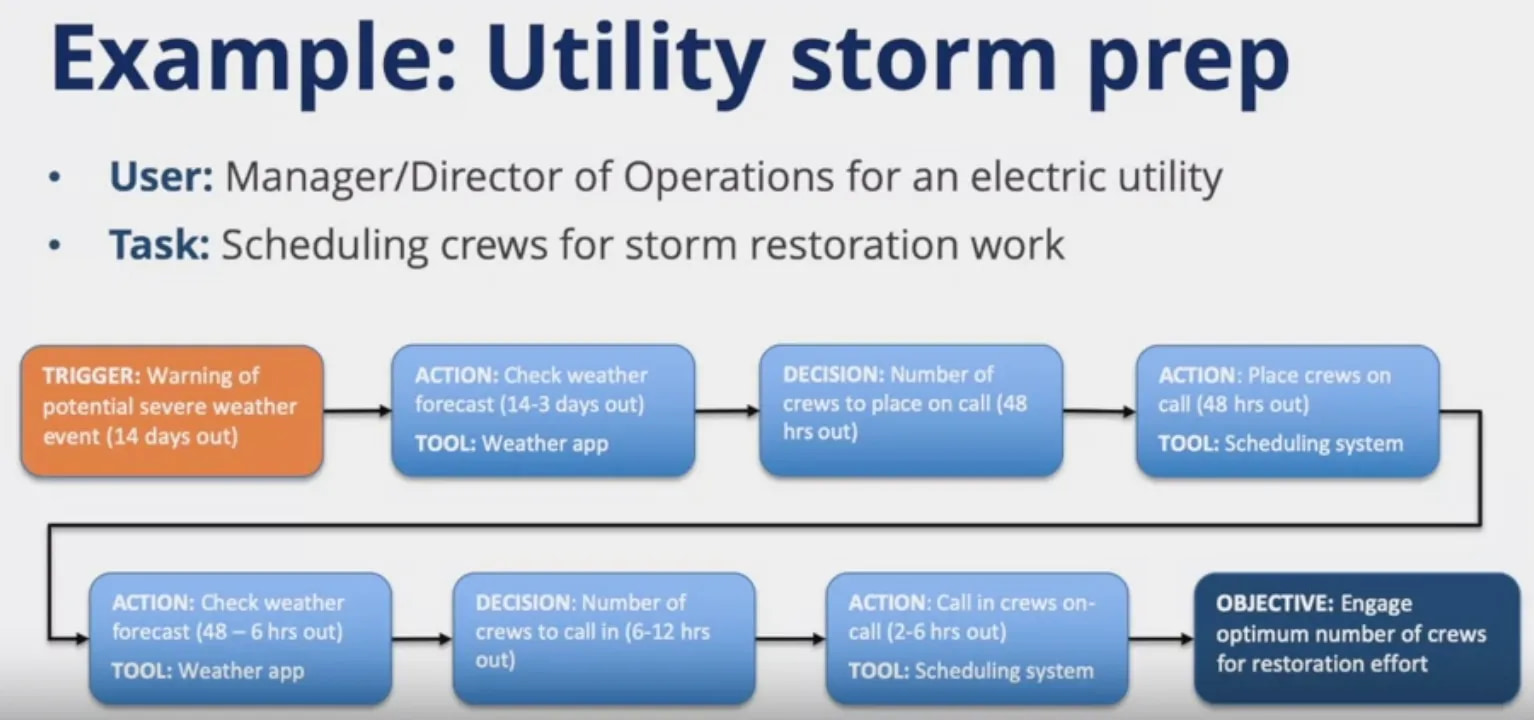
- Create a task flow diagram – it’s basically a flowchart of how users actually get stuff done
- Example: a utility manager scheduling storm crews
Human-Centered Machine Learning
7 steps to stay focused on the user when designing with ML, by Josh Lovejoy and Jess Holbrook
Machine learning (ML) is the science of helping computers discover patterns and relationships in data instead of being manually programmed. It’s a powerful tool for creating personalized and dynamic experiences, and it’s already driving everything from Netflix recommendations to autonomous cars. But as more and more experiences are built with ML, it’s clear that UXers still have a lot to learn about how to make users feel in control of the technology, and not the other way round.
As was the case with the mobile revolution, and the web before that, ML will cause us to rethink, restructure, displace, and consider new possibilities for virtually every experience we build. In the Google UX community, we’ve started an effort called “human-centered machine learning” (HCML) to help focus and guide that conversation. Using this lens, we look across products to see how ML can stay grounded in human needs while solving them in unique ways only possible through ML. Our team at Google works with UXers across the company to bring them up to speed on core ML concepts, understand how to integrate ML into the UX utility belt, and ensure ML and AI are built in inclusive ways.
If you’ve just started working with ML, you may be feeling a little overwhelmed by the complexity of the space and the sheer breadth of opportunity for innovation. Slow down, give yourself time to get acclimated, and don’t panic. You don’t need to reinvent yourself in order to be valuable to your team.
We’ve developed seven points to help designers navigate the new terrain of designing ML-driven products. Born out of our work with UX and AI teams at Google (and a healthy dose of trial and error), these points will help you put the user first, iterate quickly, and understand the unique opportunities ML creates.
Let’s get started.
Don’t Expect Machine Learning to Figure Out What Problems to Solve
Machine learning and artificial intelligence have a lot of hype around them right now. Many companies and product teams are jumping right into product strategies that start with ML as a solution and skip over focusing on a meaningful problem to solve.
That’s fine for pure exploration or seeing what a technology can do, and often inspires new product thinking. However, if you aren’t aligned with a human need, you’re just going to build a very powerful system to address a very small — or perhaps nonexistent — problem.
So our first point is that you still need to do all that hard work you’ve always done to find human needs. This is all the ethnography, contextual inquiries, interviews, deep hanging out, surveys, reading customer support tickets, logs analysis, and getting proximate to people to figure out if you’re solving a problem or addressing an unstated need people have. Machine learning won’t figure out what problems to solve. We still need to define that. As UXers, we already have the tools to guide our teams, regardless of the dominant technology paradigm.
Ask Yourself If ML Will Address the Problem in a Unique Way
Once you’ve identified the need or needs you want to address, you’ll want to assess whether ML can solve these needs in unique ways. There are plenty of legitimate problems that don’t require ML solutions.
A challenge at this point in product development is determining which experiences require ML, which are meaningfully enhanced by ML, and which do not benefit from ML or are even degraded by it. Plenty of products can feel “smart” or “personal” without ML. Don’t get pulled into thinking those are only possible with ML.
Gmail looks for phrases including words like “attachment” and “attached” to pop a reminder when you may have forgotten an attachment. Heuristics work great here. An ML system would most likely catch more potential mistakes but would be far more costly to build.
We’ve created a set of exercises to help teams understand the value of ML to their use cases. These exercises do so by digging into the details of what mental models and expectations people might bring when interacting with an ML system as well as what data would be needed for that system.
Here are three example exercises we have teams walk through and answer about the use cases they are trying to address with ML:
Describe the way a theoretical human “expert” might perform the task today. If your human expert were to perform this task, how would you respond to them so they improved for the next time? Do this for all four phases of the confusion matrix. If a human were to perform this task, what assumptions would the user want them to make?
Spending just a few minutes answering each of these questions reveals the automatic assumptions people will bring to an ML-powered product. They are equally good as prompts for a product team discussion or as stimuli in user research. We’ll also touch on these a bit later when we get into the process of defining labels and training models.
After these exercises and some additional sketching and storyboarding of specific products and features, we then plot out all of the team’s product ideas in a handy 2x2: user impact vs. how uniquely enhanced by ML each idea is. Have the team vote on which ideas would have the biggest user impact and which would be most enhanced by an ML solution.
This allows us to separate impactful ideas from less impactful ones as well as see which ideas depend on ML vs. those that don’t or might only benefit slightly from it. You should already be partnering with Engineering in these conversations, but if you aren’t, this is a great time to pull them in to weigh-in on the ML realities of these ideas. Whatever has the greatest user impact and is uniquely enabled by ML (in the top right corner of the above matrix) is what you’ll want to focus on first.
Fake It with Personal Examples and Wizards
A big challenge with ML systems is prototyping. If the whole value of your product is that it uses unique user data to tailor an experience to her, you can’t just prototype that up real quick and have it feel anywhere near authentic. Also, if you wait to have a fully built ML system in place to test the design, it will likely be too late to change it in any meaningful way after testing. However, there are two user research approaches that can help: using personal examples from participants and Wizard of Oz studies.
When doing user research with early mockups, have participants bring in some of their own data — e.g. personal photos, their own contact lists, music or movie recommendations they’ve received — to the sessions. Remember, you’ll need to make sure you fully inform participants about how this data will be used during testing and when it will be deleted. This can even be a kind of fun “homework” for participants before the session (people like to talk about their favorite movies after all).
With these examples, you can then simulate right and wrong responses from the system. For example, you can simulate the system returning the wrong movie recommendation to the user to see how she reacts and what assumptions she makes about why the system returned that result. This helps you assess the cost and benefits of these possibilities with much more validity than using dummy examples or conceptual descriptions.
The second approach that works quite well for testing not-yet-built ML products is conducting Wizard of Oz studies. All the rage at one time, Wizard of Oz studies fell from prominence as a user research method over the past 20 years or so. Well, they’re back.
Chat interfaces are one of the easiest experiences to test with a Wizard of Oz approach. Simply have a team mate ready on the other side of the chat to enter “answers” from the “AI.”
Quick reminder: Wizard of Oz studies have participants interact with what they believe to be an autonomous system, but which is actually being controlled by a human (usually a teammate).
Having a teammate imitate an ML system’s actions like chat responses, suggesting people the participant should call, or movies suggestions can simulate interacting with an “intelligent” system. These interactions are essential to guiding the design because when participants can earnestly engage with what they perceive to be an AI, they will naturally tend to form a mental model of the system and adjust their behavior according to those models. Observing their adaptations and second-order interactions with the system are hugely valuable to informing its design.
Weigh the Costs of False Positives and False Negatives
Your ML system will make mistakes. It’s important to understand what these errors look like and how they might affect the user’s experience of the product. This is a key concept in ML called the confusion matrix, and it describes what it looks like when an ML system gets it right and gets it wrong.
While all errors are equal to an ML system, not all errors are equal to all people. For example, if we had a “is this a human or a troll?” classifier, then accidentally classifying a human as a troll is just an error to the system. It has no notion of insulting a user or the cultural context surrounding the classifications it is making. It doesn’t understand that people using the system may be much more offended being accidentally labeled a troll compared to trolls accidentally being labeled as people. But maybe that’s our people-centric bias coming out. :)
In ML terms, you’ll need to make conscious trade-offs between the precision and recall of the system. That is, you need to decide if it is more important to include all of the right answers even if it means letting in more wrong ones (optimizing for recall), or minimizing the number of wrong answers at the cost of leaving out some of the right ones (optimizing for precision). For example, if you are searching Google Photos for “playground,” the results might include a few scenes of children playing, but not on a playground. In this case, recall is taking priority over precision. It is more important to get all of the playground photos and include a few that are similar but not exactly right than it is to only include playground photos and potentially exclude the photo you were looking for.
Plan for Co-Learning and Adaptation
The most valuable ML systems evolve over time in tandem with users’ mental models. When people interact with these systems, they’re influencing and adjusting the kinds of outputs they’ll see in the future. Those adjustments in turn will change how users interact with the system, which will change the models… and so on, in a feedback loop. This can result in “conspiracy theories” where people form incorrect or incomplete mental models of a system and run into problems trying to manipulate the outputs according to these imaginary rules. You want to guide users with clear mental models that encourage them to give feedback that is mutually beneficial to them and the model.
An example of the virtuous cycle is how Gboard continuously evolves to predict the user’s next word. The more someone uses the system’s recommendations, the better those recommendations get. (See research.googleblog.com for more.)
While ML systems are trained on existing data sets, they will adapt with new inputs in ways we often can’t predict before they happen. So we need to adapt our user research and feedback strategies accordingly. This means planning ahead in the product cycle for longitudinal, high-touch, as well as broad-reach research together. You’ll need to plan enough time to evaluate the performance of ML systems through quantitative measures of accuracy and errors as users and use cases increase, as well as sit with people while they use these systems to understand how mental models evolve with every success and failure.
Additionally, as UXers we need to think about how we can get in situ feedback from users over the entire product lifecycle to improve the ML systems. Designing interaction patterns that make giving feedback easy as well as showing the benefits of that feedback quickly, will start to differentiate good ML systems from great ones.
The Google app asks every once in awhile if a particular card is useful right now to get feedback on its suggestions, and Google Search Autocomplete lets people give feedback including why predictions may be inappropriate.
Teach Your Algorithm Using the Right Labels
As UXers, we’ve grown accustomed to wireframes, mockups, prototypes, and redlines being our hallmark deliverables. Well, curveball: when it comes to ML-augmented UX, there’s only so much we can specify. That’s where “labels” come in.
Labels are an essential aspect of machine learning. There are people whose job is to look at tons of content and label it, answering questions like “is there a cat in this photo?” And once enough photos have been labeled as “cat” or “not cat,” you’ve got a data set you can use to train a model to be able to recognize cats. Or more accurately, to be able to predict with some confidence level whether or not there’s a cat in a photo it’s never seen before. Simple, right?
The challenge comes when you venture into territory where the goal of your model is to predict something that might feel subjective to your users, like whether or not they’ll find an article interesting or a suggested email reply meaningful. But models take a long time to train, and getting a data set fully labeled can be prohibitively expensive, not to mention that getting your labels wrong can have a huge impact on your product’s viability.
So here’s how to proceed: Start by making reasonable assumptions and discussing those assumptions with a diverse array of collaborators. These assumptions should generally take the form of “for ________ users in ________ situations, we assume they’ll prefer ________ and not ________.” Then get these assumptions into the hackiest prototype possible as quickly as possible in order to start gathering feedback and iterating.
Find experts who can be the best possible teachers for your machine learner — people with domain expertise relevant to whatever predictions you’re trying to make. We recommend that you actually hire a handful of them, or as a fallback, transform someone on your team into the role. We call these folks “Content Specialists” on our team.
By this point, you’ll have identified which assumptions are feeling “truthier” than others. But before you go big and start investing in large-scale data collection and labeling, you’ll want to perform a critical second round of validation using examples that have been curated from real user data by Content Specialists. Your users should be testing out a high-fidelity prototype and perceive that they’re interacting with a legit AI (per the wizarding point above).
With validation in-hand, have your Content Specialists create a broad portfolio of hand-crafted examples of what you want your AI to produce. These examples give you a roadmap for data collection, a strong set of labels to start training models, and a framework for designing large scale labeling protocols.
Extend Your UX Family — ML Is a Creative Process
Think about the worst micro-management “feedback” you’ve ever received as a UXer. Can you picture the person leaning over your shoulder and nit-picking your every move? OK, now keep that image in your mind… and make absolutely certain that you don’t come across like that to your engineers.
There are so many potential ways to approach any ML challenge, so as a UXer, getting too prescriptive too quickly may result in unintentionally anchoring — and thereby diminishing the creativity of — your engineering counterparts. Trust them to use their intuition and encourage them to experiment, even if they might be hesitant to test with users before a full evaluation framework is in place.
Machine learning is a much more creative and expressive engineering process than we’re generally accustomed to. Training a model can be slow-going, and the tools for visualization aren’t great yet, so engineers end up needing to use their imaginations frequently when tuning an algorithm (there’s even a methodology called “Active Learning” where they manually “tune” the model after every iteration). Your job is to help them make great user-centered choices all along the way.
Work together with Engineering, Product, etc. to piece together the right experience.
So inspire them with examples — decks, personal stories, vision videos, prototypes, clips from user research, the works — of what an amazing experience could look and feel like, build up their fluency in user research goals and findings, and gently introduce them to our wonderful world of UX crits, workshops, and design sprints to help manifest a deeper understanding of your product principles and experience goals. The earlier they get comfortable with iteration, the better it will be for the robustness of your ML pipeline, and for your ability to effectively influence the product.
Conclusion
These are the seven points we emphasize with teams in Google. We hope they are useful to you as you think through your own ML-powered product questions. As ML starts to power more and more products and experiences, let’s step up to our responsibility to stay human-centered, find the unique value for people, and make every experience great.
Authors: Josh Lovejoy is a UX Designer in the Research and Machine Intelligence group at Google. He works at the intersection of Interaction Design, Machine Learning, and unconscious bias awareness, leading design and strategy for Google’s ML Fairness efforts.
Jess Holbrook is a UX Manager and UX Researcher in the Research and Machine Intelligence group at Google. He and his team work on multiple products powered by AI and machine learning that take a human-centered approach to these technologies.
One thing I’d add on the Wizard-of-Oz point above: this kind of prototyping is usually a step or two beyond the phase of figuring out what to build. I wouldn’t test usability upfront if I didn’t already know the underlying solution was worth building in the first place – don’t lose sight of the existential risk of building the wrong thing altogether.
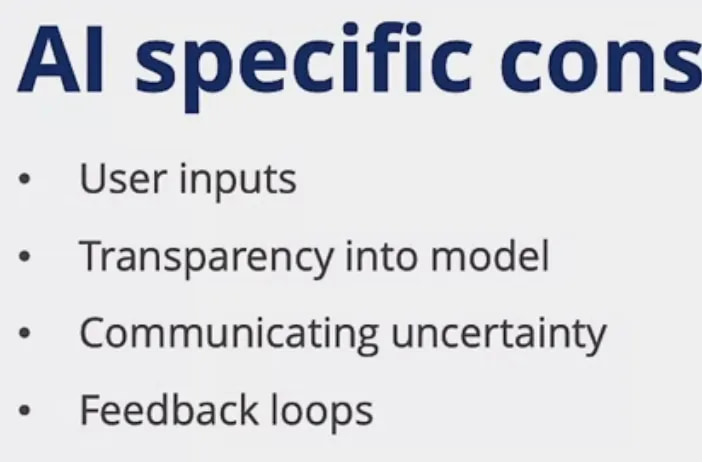
Key UX Considerations for AI Products
User Input - Make It Worth Their While
User input can be variety of things – data, files, actions like votes and clicks and purchases. Try to provide some benefit to users when they are providing the data - like “we collect your likes so that we can recommend content you’ll actually like.”
The Cold-Start Problem: When a new user comes on board, you might not have enough info for personalized recommendations. Solutions:
- Heuristic approach (show most popular items)
- Calibration step (quick quiz about preferences)
Transparency basics:
- Explain why you’re collecting their data and how you intend to use it
- How would they benefit?
- How can they see/modify/delete their data?
Transparency - When and How Much to Pull Back the Curtain
Transparency means telling the user that an AI exists, what it’s doing, how it’s getting conclusions, and limitations – for instance, ChatGPT can be wrong.
Aim for as much transparency as possible - but it depends on the use case. A person’s not gonna care so much about how AutoCorrect works, but they probably care a lot about why they were rejected for a mortgage.
Simple examples that work:
- Google Maps: “Based on visits to this place”
- Hurricane classification: Show the windspeeds, sea surface temperatures, etc.
See also: Your Apps Know Where You Were Last Night, and They’re Not Keeping It Secret (New York Times, 2018) on how much can be inferred and disclosed from location data alone.
Communicating Uncertainty - The Probability Problem
There’s a nuance in whether to expose the probability that the ML model is using. Do you translate from probability into deterministic output like yes/no or levels 1-5?
Face ID example: Users just want to unlock their phone, they don’t care about the 99.97% probability. Medical diagnosis: Doctors probably care about probability that assessment is correct. Hurricane prediction: 55% chance Level 3, but 24% chance Level 4 - city planners need scenario planning.
Feedback Loops - The Double-Edged Sword
Set up feedback loops for users to provide feedback, either directly or indirectly. However, be aware that unintentional biases can be created – for instance, if you tend to suggest the most popular product to every new user, then that product is always going to be top seller.
Explicit feedback: Google’s “report inappropriate content” button. Implicit feedback: Stitch Fix - what you keep vs. return teaches their model your style.
The Amazon Toilet Seat Problem: Buy one toilet seat, suddenly Amazon thinks you’re obsessed with toilet seats. Need guardrails and monitoring.
Key Takeaways (The Stuff I Actually Want to Remember)
- Always start with human needs, not AI capabilities - resist the hammer/nail problem
- Design thinking becomes even more critical with AI - use it to validate whether AI is needed
- Wizard of Oz prototyping is your friend for testing AI concepts early
- Plan for the co-evolution of users and models from day one
- Transparency and feedback loops aren’t nice-to-haves, they’re core UX components
- Remember: your model is just helping users get their real job done
Conclusion: Putting Humans First in the Age of AI
The technology is powerful, but human needs must drive it. Design thinking principles become even more critical with AI, and success comes from understanding the user’s real job to be done. Build systems that augment human intelligence – don’t just automate tasks.